
Section 10.2.1 · Chapter 10: More Objects
Sub-link Table - Basic Operations
You can display the sub-link table of the specified link by
using a sub-link table. With the Sub-link table, the operator can enable or
disable a sub-link and show or hide communication error message at runtime.
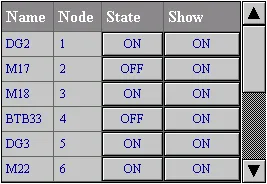
The above is an example of the sub-link table. The first row is the title row. It displays the title of each column. The other rows display one sub-link per row. You can create scroll button groups or scroll bars to scroll the contents. A sub-link table can have four columns. The following table describes the content of each column for a sub-link table.
| Column | Description |
|---|---|
| Name | The name of the sub-link. |
| Node | The node address of the sub-link. |
| State | The communication state for the selected sub-link. If the state is On, the panel will communicate with the sub-link after running the application. If the state is Off, the panel will not communicate with the sub-link until the communication state is turned On in a sub-link table. Push the button in the cell to enable or disable a sub-link. |
| Show | If the state is On, the communication error message will be shown when the sub-link encounters communication errors. If the state is OFF, no error message will be shown for any communication errors. Push the button to show or not show the error message |
The text color and font of a row are determined by the settings in the General Page.
You can complete all the settings of a sub-link table in the Sub-link Table dialog box. This dialog box contains the following two pages.
■ General
Described in Section 10.2.4.
■ Visibility
Described in
Section 4.4.6.
Need PM Designer itself?
V4 for current PK, PT, ITV and PM panels, V2 for older models. Free, sent by email.
Source.Section 10.2.1 of the PM Designer Software User Manual, Edition 2.0, © Cermate Technologies Inc. (www.cermate.com, service@cermate.com). Reproduced online, with the manual's own figures, by TSL Automation Solutions, authorised Cermate distributor, for users of Cermate HMI panels. PM Designer and PanelMaster are trademarks of Cermate Technologies Inc.
Text and figures are the manufacturer's and may describe features your panel or software version does not have. For a plain-language introduction read the PM Designer guide; for help with a specific panel contact TSL Automation.