
Section 18.1.2 · Chapter 18: Compiling/Simulating/Downloading A Panel Application
Building a Panel Runtime Package
A Panel Runtime Package (PRP) includes the panel runtime data and system programs. To build a panel runtime package, you can do the following:
-
In the menu bar, click Panel to bring up the Panel sub-menu. Click Build Panel Runtime Package (PRP)…in the Panel sub-menu.
-
If the compilation is completed successfully, you will be asked to specify the file name in the Save As… dialog to save the package into a PRP file.
Note: The PRP file that includes the application and the system programs is portable. You can save the PRP file anywhere on the PC or a USB disk and download it to the target panel with the software or Data Transfer Helper (DTH).
PRP Password for PRP
The software will show you a password after it built a PRP (Panel Runtime Package) file successfully. We call the password a PRP password. You can use it when a password is required while you are updating an HMI unit with the PRP file. In the past, if someone else was responsible for updating an HMI unit with a PRP file, you need to give that person the developer password. As the developer password allows a person to do almost anything on the HMI units, giving out the developer password is risky. Now with the provision of the PRP password, you will no longer have this concern.
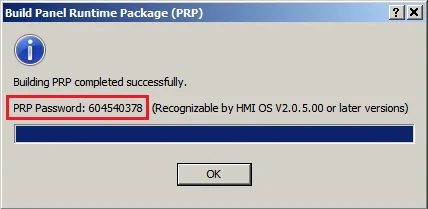
Notes:
1) A PRP password is derived from the developer password of a project. The PRP password of a project will remain the same if the developer password is not changed.
2) The developer password is still usable for updating HMI units with PRP file.
3) Only the HMI units with the OS of V2.0.5.00 or later are able to recognize PRP passwords.
Need PM Designer itself?
V4 for current PK, PT, ITV and PM panels, V2 for older models. Free, sent by email.
Source.Section 18.1.2 of the PM Designer Software User Manual, Edition 2.0, © Cermate Technologies Inc. (www.cermate.com, service@cermate.com). Reproduced online, with the manual's own figures, by TSL Automation Solutions, authorised Cermate distributor, for users of Cermate HMI panels. PM Designer and PanelMaster are trademarks of Cermate Technologies Inc.
Text and figures are the manufacturer's and may describe features your panel or software version does not have. For a plain-language introduction read the PM Designer guide; for help with a specific panel contact TSL Automation.