
Section 15.4.1 · Chapter 15: Using Macros
Native Script Notations and Terminology
The following notations and terminology will be used in the Native Script Commands and Examples sections.
■ Notations
1) P1, P2, P3, P4, P5: Parameters of native script commands.
2) I, E, C, A, CS, M, AE, CE: Used to indicate the type of parameter a native
script command can accept for a specific command parameter.
| Abbreviation | Parameter Type |
|---|---|
| I |
Internal Variable |
| E | External Variable |
| C | Constant |
| A | ASCII character string |
| CS | Character string of the program label |
| M | Sub-macro name |
| AE | Arithmetic expression |
| CE | Comparison expression |
3) U, S, UD, SD, F, B: Used to indicate the types of data a native script command can support.
| Abbreviation | Data Type |
|---|---|
| U |
16-bit Unsigned Integer |
| S | 16-bit Signed Integer |
| UD | 32-bit Unsigned Integer |
| SD | 32-bit Signed Integer |
| F | 32-bit Floating Point |
| B | Bit |
■ Terminology
| Terminology | Definition | |||||||||
|---|---|---|---|---|---|---|---|---|---|---|
| Internal memory |
The memory space in the HMI that can be accessed by the
panel application. For example, the user memory $U, the
non-volatile memory $N, the system memory $S, and the
recipe memory $R are all parts of the internal memory. |
|||||||||
| Internal variable | An address or a tag referring to an address of a space in the internal memory. | |||||||||
| Internal bit variable |
An internal variable that refers to a bit in the
internal memory. For ease of reading, “internal variable” is used instead of “internal bit variable” when referring to a bit if there is no ambiguity. |
|||||||||
| Internal word variable |
An internal variable that refers to a word in the
internal memory. The variables can also be used to refer to a double-word, a block of bytes (byte array), a block of words (word array), and a block of double-words (double-word array). For ease of reading, “internal variable” is used instead of “internal word variable” when referring to a word or a block of memory space if there is no ambiguity. |
|||||||||
| External memory | The memory space or collection of addressable devices in the controllers that can be accessed by the panel application through communication links. | |||||||||
| External variable | An address or a tag referring to an address of a space in the external memory. | |||||||||
| External bit variable |
An external variable that refers to a bit in the
external memory. For ease of reading, “external variable” is used instead of “external bit variable” when referring to a bit if there is no ambiguity. |
|||||||||
| External word variable |
An external variable that refers to a word in the
external memory. The variables can also be used to refer to a double-word, a block of bytes (byte array), a block of words (word array), and a block of double-words (double-word array) if the access unit of the associated addresses is word. If the access unit is double-word, you can only use the variable to refer to a double-word or a block of memory space with a length of a multiple of 4 (bytes). For ease of reading, “external variable” is used instead of “external word variable” when referring to a word or a block of memory space if there is no ambiguity, |
|||||||||
| Expression |
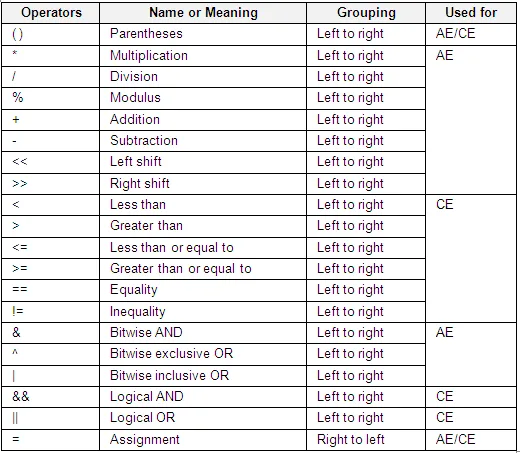 Note: The above table lists the operators in order of precedence (from highest to lowest precedence). Operators in the same segment of the table have equal precedence and are evaluated in the given order in an expression unless explicitly forced by parentheses. |
Need PM Designer itself?
V4 for current PK, PT, ITV and PM panels, V2 for older models. Free, sent by email.
Source.Section 15.4.1 of the PM Designer Software User Manual, Edition 2.0, © Cermate Technologies Inc. (www.cermate.com, service@cermate.com). Reproduced online, with the manual's own figures, by TSL Automation Solutions, authorised Cermate distributor, for users of Cermate HMI panels. PM Designer and PanelMaster are trademarks of Cermate Technologies Inc.
Text and figures are the manufacturer's and may describe features your panel or software version does not have. For a plain-language introduction read the PM Designer guide; for help with a specific panel contact TSL Automation.