
Section 16.1 · Chapter 16: Schedule
Using Schedule
The schedule function allows the HMI to perform a specified
operation at the designated time. For example, the HMI can turn on a motor at
the designated stat time and turn off that motor at the designated end time.
Another example is that the HMI can set the running mode temperature at the
designated start time of a process and reset the temperature to the standby
temperature at the designated end time of that process.
Up to 80 schedules (Number 1 to Number 80) can be registered in a panel
application. Each schedule can be programmed to either change the value of a
specified PLC location or execute a specified macro at the designated time.
To use schedule in your application, please do the following:
-
Setting up Schedule
Described in Section 16.2. -
Creating and configuring Schedule Setting Table screen object
Described in Section 16.3.
Notes:
-
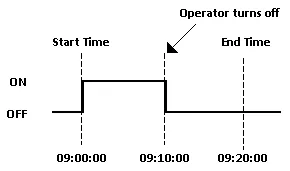
The time schedule features are one time actions. When the Start Time is reached, the designated device address is written to just once. The write action is not repeated.
-
The Start Value and the Prohibit Action Bit are read only once at the beginning of the time range. Since regular readout is not possible, there may be a slight data communication delay that causes a slight delay in the Start Time. Due to the same reason, the delay may occur in the End Time.
-
When the time range of a schedule is changed by whatever method and the current time is inside the time range, the start action is performed.
-
When the same Start Times and End Times appear in multiple schedules, they are handled in order, starting from the smallest schedule number.
-
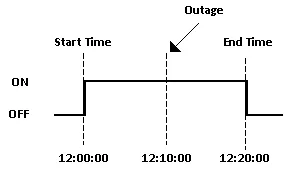
If the Start Action is completed and then a power outage occurs, the End Action will be performed at the End Time after the power is resumed.
Need PM Designer itself?
V4 for current PK, PT, ITV and PM panels, V2 for older models. Free, sent by email.
Source.Section 16.1 of the PM Designer Software User Manual, Edition 2.0, © Cermate Technologies Inc. (www.cermate.com, service@cermate.com). Reproduced online, with the manual's own figures, by TSL Automation Solutions, authorised Cermate distributor, for users of Cermate HMI panels. PM Designer and PanelMaster are trademarks of Cermate Technologies Inc.
Text and figures are the manufacturer's and may describe features your panel or software version does not have. For a plain-language introduction read the PM Designer guide; for help with a specific panel contact TSL Automation.