
Section 16.2.3 · Chapter 16: Schedule
Time Setting Block
The following table shows the word arrangement of the Time Setting Block.
|
Word No. |
Usage | Description |
|---|---|---|
| 0 | Time Setting Control Word |
 Bit 0: Time Acquisition Request Bit When the HMI detects that the Time Acquisition Request Bit turns on (from 0 to 1), it reads out from word 2 to word 10 of the Time Setting Block to get the Action Mode, the Start Time, and the End Time for the schedule. |
| 1 | Time Setting Status Word |

Bit 0: Time Acquisition Completion Bit - 0: Either Time Acquisition is being performed or have not been performed - 1: Time Acquisition completed Bit 1: Error Notification Bit - 0: Time data is being replaced with correct data - 1: Time data contains an error Note: 1) The device/PLC must turn the Time Acquisition Request Bit off (1 to 0) when recognizes that the Time Acquisition Completion Bit turns on (0 to 1) 2) When the HMI detects that the Time Acquisition Request Bit is turned off (1 to 0), it turns off the Time Acquisition Completion Bit and Error Notification Bit immediately. 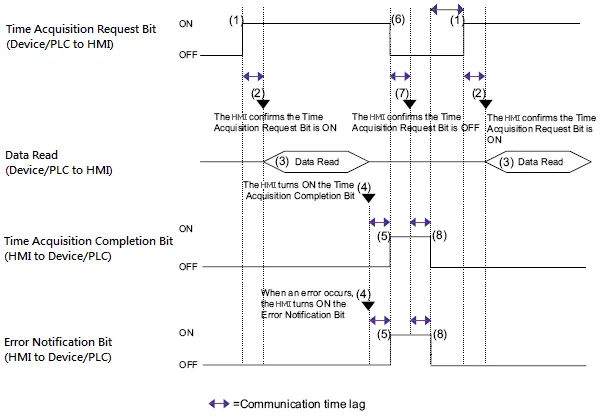
|
| 2 | Action Mode |

Bit 0: End Action Bit - 0: Disable the End Action of the schedule - 1: Enable the End Action of the schedule Bit 1: Individual Day Specification Bit - 0: The Start Day and End Day of the schedule are the same. - 1: The Start Day and End Day of the schedule are different. Note: If Individual Day Specification Bit is 1 and two or more of the Start/End Day bits turn on simultaneously, an error occurs. |
| 3 | Start Day or the month of the Special Day |
Designate the day used as a trigger for the Start/End Action. 
Bit 00: Sunday (0: None, 1: Designate) Bit 01: Monday (0: None, 1: Designate) Bit 02: Tuesday (0: None, 1: Designate) Bit 03: Wednesday (0: None, 1: Designate) Bit 04: Thursday (0: None, 1: Designate) Bit 05: Friday (0: None, 1: Designate) Bit 06: Saturday (0: None, 1: Designate) If the schedule is configured for the Special Day, the high byte of word 3 (Start Day) should contain the month (1-12) of the Special Day and the low byte of word 3 should contain the day (1-31) of the Special Day. The content of word 7 (End Day) should be 0.  |
| 4 | Start Time (Hour) | Hour: 0-23 |
| 5 | Start Time (Min.) | Minute: 0-59 |
| 6 | Start Time (Sec.) | Second: 0-59 |
| 7 | End Day or the day of the Special Day | Same as Start Day or the month of the Special Day. |
| 8 | End Time (Hour) | Hour: 0-23 |
| 9 | End Time (Min.) | Minute: 0-59 |
| 10 | End Time (Sec.) | Second: 0-59 |
Need PM Designer itself?
V4 for current PK, PT, ITV and PM panels, V2 for older models. Free, sent by email.
Source.Section 16.2.3 of the PM Designer Software User Manual, Edition 2.0, © Cermate Technologies Inc. (www.cermate.com, service@cermate.com). Reproduced online, with the manual's own figures, by TSL Automation Solutions, authorised Cermate distributor, for users of Cermate HMI panels. PM Designer and PanelMaster are trademarks of Cermate Technologies Inc.
Text and figures are the manufacturer's and may describe features your panel or software version does not have. For a plain-language introduction read the PM Designer guide; for help with a specific panel contact TSL Automation.