
Section 2.2.1 · Chapter 2: Creating Projects
Languages
This section describes how to set up the languages for the project using the Languages dialog box. Each panel application in the project can have up to 10 languages for the screen texts. The following is an example of the Languages dialog box.
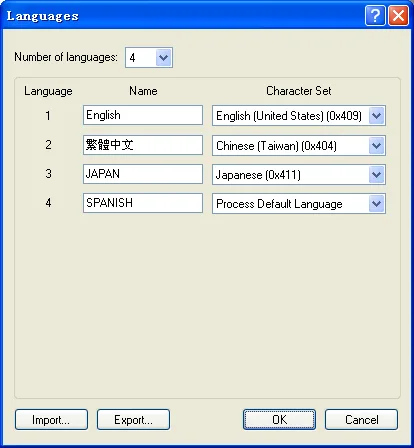
The following table describes each property in the Languages dialog box.
|
Property |
Description |
|---|---|
| Number of languages | Specifies how many languages the project will have. |
| Language | The index of the language. |
| Name | Specifies a name for a language. The name must be unique within the project. |
| Character Set | Specifies the character set for a language to determine how to translate the bytes in the text into characters on the screen. |
| Import... | Click it to import the languages settings from a LNG file. |
| Export... | Click it to export the languages settings to a LNG file. |
| OK | Click it to close the dialog box and accepts all changes. |
| Cancel | Click it to close the dialog box and discard all changes. |
 |
Click it to open the help document for more details about the dialog and how to use it. |
 |
Click it to close the dialog box and discard all
changes. |
Need PM Designer itself?
V4 for current PK, PT, ITV and PM panels, V2 for older models. Free, sent by email.
Source.Section 2.2.1 of the PM Designer Software User Manual, Edition 2.0, © Cermate Technologies Inc. (www.cermate.com, service@cermate.com). Reproduced online, with the manual's own figures, by TSL Automation Solutions, authorised Cermate distributor, for users of Cermate HMI panels. PM Designer and PanelMaster are trademarks of Cermate Technologies Inc.
Text and figures are the manufacturer's and may describe features your panel or software version does not have. For a plain-language introduction read the PM Designer guide; for help with a specific panel contact TSL Automation.