
Section 2.2.3.2 · Chapter 2: Creating Projects
Picture Groups
The picture database can contain picture groups.
A picture group is a collection of pictures. Each picture in a picture group represents one state. When a picture group is displayed as the picture shape of an object, the picture that corresponds to the current object state is shown. This is the main benefit of using a picture group as the object shape because it can show each object state with a different picture.
When a picture group is used as the shape for buttons or switches, you may
want it to look differently when it is pressed. In order to support the pressed
look, a picture group needs two pictures for each state: one picture for the
normal (released) look, and another picture is for the pressed look.
For example, a 3-state multi-state switch needs a picture group that contains 6
pictures as its picture shape if the pressed look is required.
The following is an example of a picture group supporting 3 states and the pressed look.
|
Picture Group |
State | Pictures |
|---|---|---|
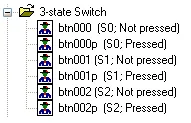 |
0 (Normal/Released) |
 |
| 0 (Pressed) |
 |
|
| 1 (Normal/Released) |
 |
|
| 1 (Pressed) |
 |
|
| 2 (Normal/Released) |
 |
|
| 2 (Pressed) |
 |
Need PM Designer itself?
V4 for current PK, PT, ITV and PM panels, V2 for older models. Free, sent by email.
Source.Section 2.2.3.2 of the PM Designer Software User Manual, Edition 2.0, © Cermate Technologies Inc. (www.cermate.com, service@cermate.com). Reproduced online, with the manual's own figures, by TSL Automation Solutions, authorised Cermate distributor, for users of Cermate HMI panels. PM Designer and PanelMaster are trademarks of Cermate Technologies Inc.
Text and figures are the manufacturer's and may describe features your panel or software version does not have. For a plain-language introduction read the PM Designer guide; for help with a specific panel contact TSL Automation.