
Section 11.5.1 · Chapter 11: Recipes and Recipes Objects
Recipe Block - General Settings
Use the General page to define the general settings for a recipe block. The following is an example of the General page.
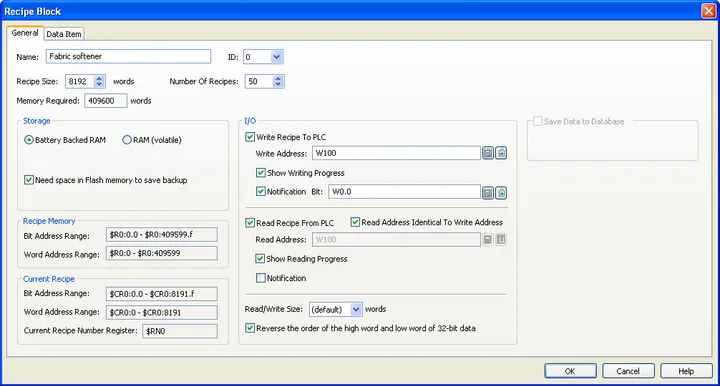
The table below describes each property in the General page.
|
Property |
Description | |||
|---|---|---|---|---|
| Name | The recipe block's name. The maximum length of the name is 48 characters. | |||
| ID | The recipe block's ID number. Select a number between 0 and 15. The number is unique among all recipe blocks of the panel application. | |||
| Recipe Size | Specifies the data size that each recipe contains. The unit is word. It can be up to 8192 words. | |||
| Number of Recipes | Specifies the maximum number of recipes that the recipe memory can hold. | |||
| Memory Required | The size of the recipe memory. The unit is word. The formula to calculate the size is: Memory Required = Recipe Size * Number of Recipes | |||
| Storage | Battery Backed RAM | Check this option so the recipe memory will be located in the battery backed RAM. The recipe data will not be lost after power off if the battery backed RAM is used. | ||
| RAM (volatile) | Check this option so the recipe memory will be located in the ordinary RAM, and the recipe memory will be cleared whenever the target panel is powered on. | |||
| Need space in flash ROM to save backup | Check this option if you need space in the flash ROM to save backup recipes. You need to specifies the file name to save the backup. | |||
| Write Recipe To PLC | Check the option if you want to write the recipe to PLC | |||
| Write Address |
Available when Write Recipe To PLC is checked. Specifies
the variable that is the starting address of the Recipe
Block in your PLC. Click  to enter an address for this field. Click  to select a tag for this field. The size of the recipes to be written is specified in the Read/Write Size field. |
|||
| Show Writing Progress | Check the option if you want to show the progress when writing the recipe block. | |||
| Notification | Check this option if you want the recipe to set the bit specified in the Bit Field to On when it finishes writing a recipe to PLC. | |||
| Bit |
Available when the Notification field is checked.
Specifies the bit for the operation done notification.
Click
to enter an address for this field. Click
to select a tag for this field. |
|||
| Read Recipe From PLC | Check this option if you want to read recipes from PLC. | |||
| Read Address Identical To Write Address | Specifies that the Read Address is identical to the Write Address. With this item checked, you don’t need to specify the Read Address again. This item is available when the option Read Recipe From PLC is checked. | |||
| Read Address |
Available when Read Recipe From PLC is checked.
Specifies the variable representing the starting address
of the recipe block on your PLC. Click to enter an address for this field. Click
to
select a tag for this field. The size of the recipes to
be read is specified in the Read/Write Size field. |
|||
| Show Reading Progress | Check the option if you want to show the progress when reading the recipe block. | |||
| Notification | Check the option if you want the recipe to set the bit specified in the Bit Field to On when it finishes reading a recipe from PLC. | |||
| Bit |
Available when the Notification field is checked.
Specifies the bit for the operation done notification.
Click
to enter an address for this field. Click
to
select a tag for this field. |
|||
| Read/Write Size | The size of the recipe for reading and writing. | |||
| Reverse the order of the high word and low word of 32-bit data | Check this option if the Write Address or the Read Address belongs to a controller that stores data in big-endian byte order and if there are 32-bit data items, such as 32-bit signed integers and 32-bit floating point numbers, defined in the recipe block. | |||
| Recipe Memory | Set the overall recipe block’s address range in the internal memory of the panel. | |||
| Range Type | Address Format | Description | ||
| Bit Address Range |
$Rm:n.b b: 0-f |
Each bit address in the range refers to a bit of a recipe word in the specified recipe block. | ||
| Word Address Range | $Rm:n | Each word address in the range refers to a recipe word | ||
| Legend: m = Recipe Block ID, n = The Number of Recipe Word, b = Bit Number | ||||
| Current Recipe | Set the current recipe’s address range in the internal memory of the panel. | |||
| Range Type | Address Format | Description | ||
| Bit Address Range |
$CRm:n.b b: 0-f |
Each bit address in the range refers to a bit of a recipe word in the current recipe of the specified recipe block. | ||
| Word Address Range | $CRm:n | Each word address in the range refers to a recipe word in the current recipe of the specified recipe block. | ||
| Current Recipe Number Register | $RNm | An internal register of the panel that specifies the current recipe number of the specified recipe block. | ||
| Legend: m = Recipe Block ID, n = The Number of Recipe Word, b = Bit Number. | ||||
Need PM Designer itself?
V4 for current PK, PT, ITV and PM panels, V2 for older models. Free, sent by email.
Source.Section 11.5.1 of the PM Designer Software User Manual, Edition 2.0, © Cermate Technologies Inc. (www.cermate.com, service@cermate.com). Reproduced online, with the manual's own figures, by TSL Automation Solutions, authorised Cermate distributor, for users of Cermate HMI panels. PM Designer and PanelMaster are trademarks of Cermate Technologies Inc.
Text and figures are the manufacturer's and may describe features your panel or software version does not have. For a plain-language introduction read the PM Designer guide; for help with a specific panel contact TSL Automation.