
Section 11.6.1 · Chapter 11: Recipes and Recipes Objects
Recipe Selector - Basic Operations
A recipe selector can be configured to perform as one of the following types of controls:
|
Type |
Description | |
|---|---|---|
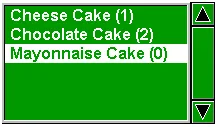
| List |
The recipe selector is a list box. It displays a list of
index strings of the recipes in the specified recipe
block. The index string’s format is recipe name (recipe
number). One recipe index string is displayed per line. The index string of the current recipe is highlighted. If the desired recipe is not in view, you can scroll the list with the scroll bar attached to the right side of the list box. When you select a desired recipe by touching its index string, the recipe selector writes the recipe number of the selected recipe to the current recipe number register. |
 |
| Drop-down List |
The recipe selector is a drop-down list. It displays the
index string of the current recipe and a button with the
down arrow symbol as shown. When the button with down arrow symbol is pressed, the recipe selector displays a list box beneath itself as shown. 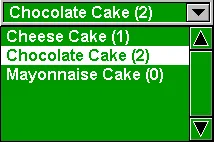 The list box lists the index strings of all the recipes of the recipe block, one index string per line. The index string of the current recipe is highlighted. If the desired recipe is not in view, you can use the scroll bar attached to the right side of the list to scroll the index string. When you select a desired recipe by touching its index string, the recipe selector writes the recipe number of the selected recipe to the current recipe number register and closes the list box. 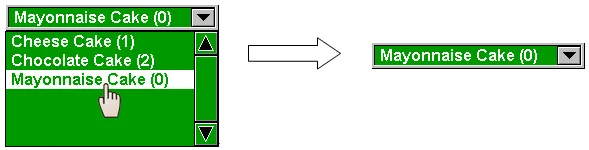 If you want to cancel the operation when the list box is showing, touch anywhere other than an index string in the list box. |
|
| Character Entry |
The recipe selector is a character entry. It
displays the index string of the current recipe. When the text field is clicked, the PinYin [for Chinese (PRC) String] or ASCII character keypad [for Byte Array (Character String)] will be shown. The following is an example of ASCII Character Keypad. 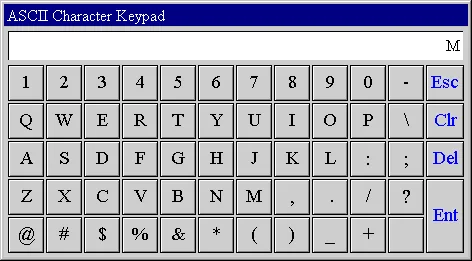 Click the "Ent" button to select a recipe with the name starting from M. If the recipe doesn’t exist, the keypad will show a “?” after the input characters and keep open for the right input. If the recipe exists, the keypad will be closed and the index string of the selected recipe will be displayed in the text field.  If you want to cancel the operation when the keypad is showing, click "Esc" button. |
|
| Drop-down List with Character Entry | The recipe selector is a combination of character entry and drop-down list. If the text field is click, it performs like the Character Entry. If a button with the down arrow symbol is pressed, it performs like a drop-down list. | |
Need PM Designer itself?
V4 for current PK, PT, ITV and PM panels, V2 for older models. Free, sent by email.
Source.Section 11.6.1 of the PM Designer Software User Manual, Edition 2.0, © Cermate Technologies Inc. (www.cermate.com, service@cermate.com). Reproduced online, with the manual's own figures, by TSL Automation Solutions, authorised Cermate distributor, for users of Cermate HMI panels. PM Designer and PanelMaster are trademarks of Cermate Technologies Inc.
Text and figures are the manufacturer's and may describe features your panel or software version does not have. For a plain-language introduction read the PM Designer guide; for help with a specific panel contact TSL Automation.