
Section 11.1 · Chapter 11: Recipes and Recipes Objects
Recipes
In this chapter we will explain how recipes in the software can be set up, stored and transferred. We also describe how to configure the basic functions and recipe objects (recipe selector and recipe table) used for recipes.
■ Recipe Block
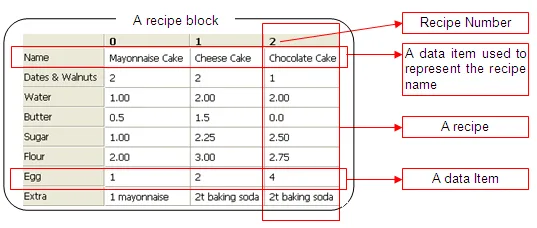
A recipe block is a memory block that stores recipe data as a two dimensional
array in the panel. The memory size of each recipe block is the product of the
size of a recipe by the number of recipes in word. You can create up to 16
recipe blocks for your application. Each recipe block can contain at most 65535
recipes. Each recipe can have as many as 4096 words of data.
■ Recipe
A recipe is a group of data items. You can use a recipe number or a recipe name
to index a recipe in the corresponding recipe block.
The recipe number is a unique number between 0 and the total number of recipes.
The current recipe number of the recipe block m is saved in the current recipe
number register $RNm (m: The recipe block ID).
The recipe name can be represented by ASCII or Unicode String. To specify ASCII
or Unicode String as the recipe name, you need to open the dialog box of a
recipe block and set the data type of the related data item into Byte Array
(Character String) or
Word Array (Double-Byte Character String) in the data item page. For details about recipe data item
settings, please see
Section 11.5.2.
■ Recipe Data Item
A data item is a word or words of data used to represent an application related
data or a machine setup parameter used in process and production control. You
can specify the format such as name, data type, size, scaling and range check
for each data item in the recipe block dialog box.
The following is a sample of a recipe block with 3 recipes and each recipe has 8
data items.
■ Recipe Data
There are two types of recipe data: CSV Data and PRD Data. These recipes can be
transferred directly between the PC and HMI or between the HMI and USB Memory
Stick/Micro SD card.
|
Recipe Data |
Description |
|---|---|
| CSV Data |
* Can be created and edited in Microsoft Excel or text
editor software (e.g., Notepad) |
| PRD Data |
* Binary Data created in the software * Can be edited in RecipeEditor |
Need PM Designer itself?
V4 for current PK, PT, ITV and PM panels, V2 for older models. Free, sent by email.
Source.Section 11.1 of the PM Designer Software User Manual, Edition 2.0, © Cermate Technologies Inc. (www.cermate.com, service@cermate.com). Reproduced online, with the manual's own figures, by TSL Automation Solutions, authorised Cermate distributor, for users of Cermate HMI panels. PM Designer and PanelMaster are trademarks of Cermate Technologies Inc.
Text and figures are the manufacturer's and may describe features your panel or software version does not have. For a plain-language introduction read the PM Designer guide; for help with a specific panel contact TSL Automation.