
Section 12.3.4 · Chapter 12: Alarms and Alarm Displays
Specifying To-be-recorded Data
You can record maximum 8 data items and display them in the alarm message.
The data item will be appended to the alarm message with the following format:
(Name: Value of the address with the specified format)
For example, the recorded item #2 will display the 32-bit floating point number
stored in W10 with the format of 4 total digits and 1 fractional digit.
If the value of W10 is 123.456 when the alarm occurs, the following text will be
appended to its alarm message:
(Temperature: 123.4)
To specify items, use the Specify To-be-recorded Data Items dialog. The following is
an example of the dialog:
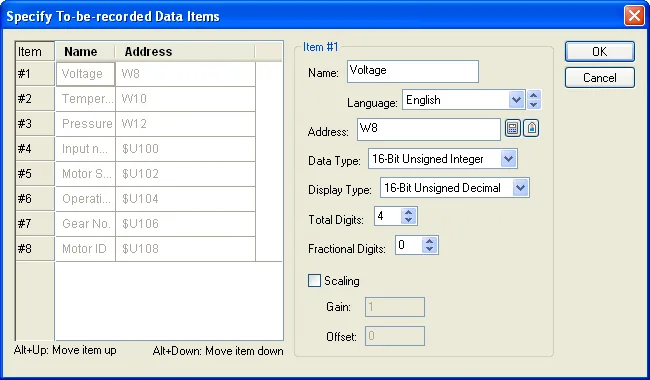
The Specify To-be-recorded Data dialog contains two parts. The left side lists the address and name of each data item. The right side shows the properties of the selected item. To select an item, click the row of the item in the list. The following table describes each property of the item.
|
Property |
Description | |||||||||||||||||||||||||
|---|---|---|---|---|---|---|---|---|---|---|---|---|---|---|---|---|---|---|---|---|---|---|---|---|---|---|
| Name | Specifies the name of the data item for the language specified in the Language field. | |||||||||||||||||||||||||
| Language | Select a language so you can view and edit the name of the item for that language. | |||||||||||||||||||||||||
| Address | The read address of the item. The address can be any valid word address. | |||||||||||||||||||||||||
| Data Type | The data type of the item. The supported data types include: 16-Bit Unsigned Integer, 32-Bit Unsigned Integer, 16-Bit Signed Integer, 32-Bit Signed Integer, 16-Bit BCD, 32-Bit BCD, 32-Bit Floating Point. | |||||||||||||||||||||||||
| Display Type |
The display type for the value of the data item. The
following table shows the available display types for
each data type.
|
|||||||||||||||||||||||||
| Total Digits | Specifies the number of digits to be displayed for the value of the item. | |||||||||||||||||||||||||
| Fractional Digits |
Specifies how to display the fractional part for the
value of the item. When the Display Type is 32-bit
Floating Point, this property specifies the number
of fractional digits to be displayed. When the
Display Type is not 32-bit Floating Point, this
property specifies not only the number of fractional
digits to be displayed, but also the number of least
significant digits to be displayed as the fractional
part. With this feature, an integer can be shown as
a fixed point number. Example:
|
|||||||||||||||||||||||||
| Scaling |
Check this option if you want the value of the data item
to be displayed in a scaled manner. The following is the
scaling formula: DisplayedValue = SampledValue * Gain + Offset Note: The Gain and Offset are 32-bit floating point numbers. They have, at most, 6 significant digits. Rounding and truncation errors may happen. |
|||||||||||||||||||||||||
| Gain | Available when the Scaling option is checked. Specifies the Gain used in the scaling formula. | |||||||||||||||||||||||||
| Offset |
Available when the Scaling option is checked. Specifies
the Offset used in the scaling formula. |
Need PM Designer itself?
V4 for current PK, PT, ITV and PM panels, V2 for older models. Free, sent by email.
Source.Section 12.3.4 of the PM Designer Software User Manual, Edition 2.0, © Cermate Technologies Inc. (www.cermate.com, service@cermate.com). Reproduced online, with the manual's own figures, by TSL Automation Solutions, authorised Cermate distributor, for users of Cermate HMI panels. PM Designer and PanelMaster are trademarks of Cermate Technologies Inc.
Text and figures are the manufacturer's and may describe features your panel or software version does not have. For a plain-language introduction read the PM Designer guide; for help with a specific panel contact TSL Automation.