
Section 12.6.5 · Chapter 12: Alarms and Alarm Displays
Alarm Display - Query Settings
This section describes how to query alarms. The following is an example of the Query page of the Alarm Display dialog box.
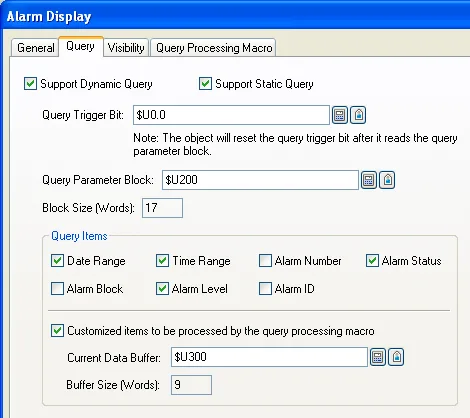
The following table describes each property in the Query page of the Alarm Display dialog box.
|
Property |
Description | ||||
|---|---|---|---|---|---|
| Support Dynamic Query | Check this option if you want the object displays the alarm records filtered by dynamic conditions set at runtime. With dynamic query, the object performs the query operation only when the trigger bit changes from Off to On at runtime. | ||||
| Support Static Query | Check this option if you want the object displays the alarm records filtered by predefined conditions. With static query, any change of query conditions at runtime will not be applied. | ||||
| Query Trigger Bit |
Specifies the bit that will trigger the query operation
at runtime. The HMI reads the Query Parameter Block and
refreshes the object according to the current query
conditions whenever the Query Trigger Bit changes from Off to On. Click to enter the bit address. Click  to enter the bit tag. Available only when the Support
Dynamic Query option is selected. |
||||
| Query Parameter Block |
Specifies the location that stores the query parameters. Click
to enter an address for this field. Click
to select a tag for this field.The following table shows the data arrangement of the parameter block. |
||||
| Word | Description | ||||
| 0 |
The query flags. |
||||
| Bit | Operation | ||||
| 0 | Query the alarm records according to the specified alarm number when the bit is on. The alarm number is specified in word 1 of the Query Parameter Block. | ||||
| 1 | Query the alarm records that occurred within the specified duration when the bit is on. The date range is specified in word 2-7 of the Query Parameter Block. The time range is specified in word 8-13 of the Query Parameter Block. | ||||
| 2 | Query the alarm records according to the specified alarm status when the bit is on. The alarm status is specified in word 14 of the Query Parameter Block. | ||||
| 3 | Query the alarm records according to the specified alarm block when the bit is on. The alarm block is specified in word 15 of the Query Parameter Block. | ||||
| 4 | Query the alarm records according to the specified alarm level when the bit is on. The alarm level is specified in word 16 of the Query Parameter Block. | ||||
| 5 | Query the alarm records according to the specified alarm ID when the bit is on. The alarm ID is specified in word 17-20 of the Query Parameter Block. | ||||
| 6~14 | Reserved for future use. Must be 0. | ||||
| 15 | Customized items handled by the query processing macro | ||||
| Note: When some of the query flags are on, the result will fulfill all query conditions. | |||||
| 1 | The alarm number. | ||||
| 2,3,4 |
The start date of the date range. Year (word 2): 0~99; Month (word 3): 1~12; Day (word 4): 1~31 |
||||
| 5,6,7 |
The end date of the date range. Year (word 5): 0~99; Month (word 6): 1~12; Day (word 7): 1~31 |
||||
| 8,9,10 |
The start time of the time range. Hour (word 8): 0~23; Minute (word 9): 0~59; Second (word 10): 0~59 |
||||
| 11,12,13 |
The end time of the time range. Hour (word 11): 0~23; Minute (word 12): 0~59; Second (word 13): 0~59 |
||||
| 14 | The alarm status. | ||||
| Bit | Description | ||||
| 0 | Show the cleared alarms | ||||
| 1 | Show the active alarms | ||||
| 2 | Show the acknowledged alarms | ||||
| 15 | The alarm block. 0~15; 64~79 | ||||
| 16 | The alarm level. 1~8 | ||||
| 17,18,19,20 | The alarm ID. Null terminated ASCII character string; Max. 6 characters | ||||
| Note: The word 1- 20 of the Query Parameter Block will be available only if the corresponding query item is selected. | |||||
| Block Size (Words) | The size in word of query parameter block. | ||||
| Query Items | Date Range | Check this option if you want the object to display the alarms that occur in the specified date range. | |||
| Time Range | Check this option if you want the object to display the alarms that occur in the specified time range. Available only when the Date Range is checked. | ||||
| Alarm Number | Check this option if you want the object to display the alarms with the specified alarm number. | ||||
| Alarm Status | Check this option if you want the object to display the alarms with the specified alarm status. | ||||
| Alarm Block | Check this option if you want the object to display the alarms with the specified alarm block. | ||||
| Alarm Level | Check this option if you want the object to display the alarms with the specified alarm level. | ||||
| Alarm ID | Check this option if you want the object to display the alarms with the specified alarm ID. | ||||
| Customized items to be processed by the query processing macro |
Check this option if you want to set query conditions in
query processing macro.
Note: A query processing macro must use QRET command to report if the currently processed record is qualified for the current query and terminate itself. Only qualified records are displayed according to the query conditions. The following is an example that the object will show the active alarms only. 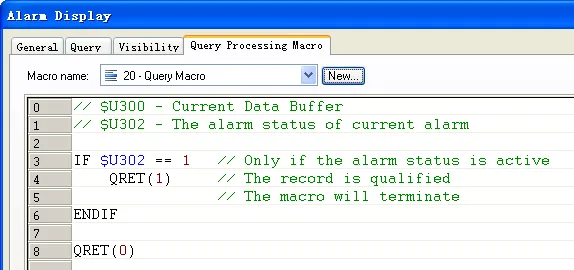 |
||||
| Current Data Buffer |
Specifies the variable representing the data buffer for
query processing macro to save the current alarm. Click
to enter an address for this field. Click
to select a tag for this field.
The following table shows the data arrangement of the
buffer. |
||||
| Word | Description | ||||
| 0 | The alarm type. 0: Discrete Alarm 1: Analog Alarm | ||||
| 1 | The alarm number. | ||||
| 2 | The alarm status. 0: Cleared 1: Active 2: ACK | ||||
| 3 | The alarm block. | ||||
| 4 | The alarm level. | ||||
| 5-8 | The alarm ID. Null terminated ASCII character string; Max. 6 characters | ||||
| Buffer Size | The size of the current data buffer. Total 9 words. | ||||
Need PM Designer itself?
V4 for current PK, PT, ITV and PM panels, V2 for older models. Free, sent by email.
Source.Section 12.6.5 of the PM Designer Software User Manual, Edition 2.0, © Cermate Technologies Inc. (www.cermate.com, service@cermate.com). Reproduced online, with the manual's own figures, by TSL Automation Solutions, authorised Cermate distributor, for users of Cermate HMI panels. PM Designer and PanelMaster are trademarks of Cermate Technologies Inc.
Text and figures are the manufacturer's and may describe features your panel or software version does not have. For a plain-language introduction read the PM Designer guide; for help with a specific panel contact TSL Automation.