
Section 5.5.1 · Chapter 5: Buttons and Switches
Slide Switch - Basic Operations
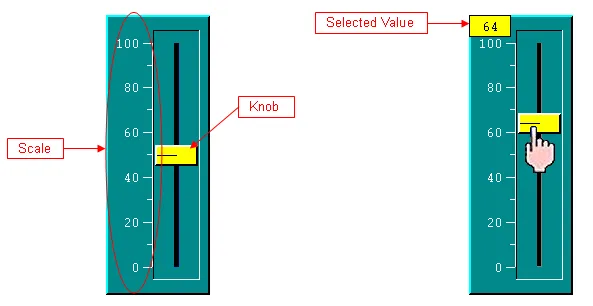
The above are two examples of slide switches. The right one shows a slide switch whose knob is being touched.
You specify the variable to be controlled, the minimum of the variable, and the maximum of the variable for a slide switch. The variable is monitored, and its value combined with the specified minimum and maximum determines the knob position of the slide switch. You can touch and move the knob to select a desired value. The selected value is shown when the knob is being held. When you release the knob, the selected value is written to the specified variable.
You can choose one of the following four directions for a slide switch:
|
Direction |
Description |
|---|---|
| Upward | The knob can move vertically. The knob is at the top end when the variable value is equal to or greater than the specified maximum. The knob is at the bottom end when the variable value is equal to or less than the specified minimum. When the variable value is between the maximum and minimum, the knob is at a proportional position between the top end and the bottom end. |
| Downward | The knob can move vertically. The knob is at the bottom end when the variable value is equal to or greater than the specified maximum. The knob is at the top end when the variable value is equal to or less than the specified minimum. When the variable value is between the maximum and minimum, the knob is at a proportional position between the bottom end and the top end. |
| Leftward | The knob can move horizontally. The knob is at the left end when the variable value is equal to or greater than the specified maximum. The knob is at the right end when the variable value is equal to or less than the specified minimum. When the variable value is between the maximum and minimum, the knob is at a proportional position between the left end and the right end. |
| Rightward | The knob can move horizontally. The knob is at the right end when the variable value is equal to or greater than the specified maximum. The knob is at the left end when the variable value is equal to or less than the specified minimum. When the variable value is between the maximum and minimum, the knob is at a proportional position between the right end and the left end. |
Need PM Designer itself?
V4 for current PK, PT, ITV and PM panels, V2 for older models. Free, sent by email.
Source.Section 5.5.1 of the PM Designer Software User Manual, Edition 2.0, © Cermate Technologies Inc. (www.cermate.com, service@cermate.com). Reproduced online, with the manual's own figures, by TSL Automation Solutions, authorised Cermate distributor, for users of Cermate HMI panels. PM Designer and PanelMaster are trademarks of Cermate Technologies Inc.
Text and figures are the manufacturer's and may describe features your panel or software version does not have. For a plain-language introduction read the PM Designer guide; for help with a specific panel contact TSL Automation.