
Section 5.9.3 · Chapter 5: Buttons and Switches
Keypad Button - General Settings
This section describes how to define the general settings for a keypad button. The following is an example of the General page of the Keypad Button property sheet.
 |
|
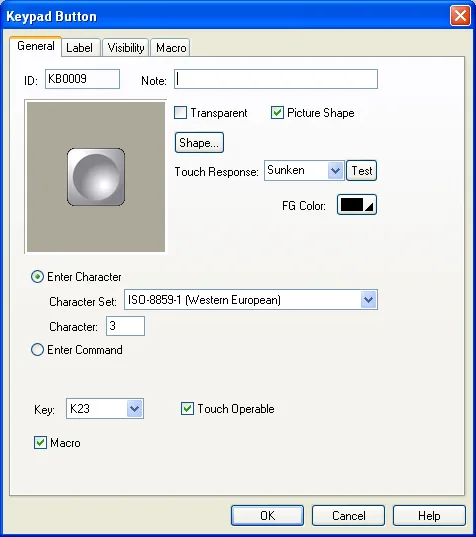
The following table describes each property in the General page.
|
Property |
Description | |
|---|---|---|
| ID | The object’s identifier. It is generated when the object is created. The identifier is unique within the screen where the object is located. The format of the IDs for keypad buttons is KBnnnn. | |
| Note | You can type a note for the keypad button group. | |
| Shape settings |
For details about the following properties, see
Section 4.3.4 Setting up the Shape of an Object.
Picture Shape,
 ,
Touch Response,  ,
Border Color, Pattern Color, FG Color, BG Color. |
|
| Enter Character | Select this item if the button is used to input the specified character to the keypad buffer. | |
| Character Set | Select one of the following three character sets to encode the entering character. | |
| Character Set | Description | |
| ASCII (US) | Defines 128 characters. | |
| ISO-8859-1 (Western European) | Covers mostly Western European languages. | |
| ISO-8859-5 (Cyrillic) | Covers languages using a Cyrillic alphabet such as Bulgarian, Belarusian, Russian, Serbian and Macedonian. | |
| Character | Available when Enter Character is selected. Specifies the character to be entered in the keypad buffer. | |
| Enter Command | Select this item if the button is used to issue the specified command to the keypad buffer. | |
| Command | Available when Enter Command is selected. Specifies the command to be issued to the keypad buffer. There are four commands available: | |
| Command | Description | |
| Enter | Completes data entry and sends the input string to the associated object or the system. | |
| Escape | Cancels the data entry operation. | |
| Clear | Clears the keypad buffer. | |
| Backspace | Removes the last character in the keypad buffer. | |
| Increase By One | Increases the keypad input buffer ($S0 ~ $S25) by one. | |
| Decrease By One | Decreases the keypad input buffer ($S0 ~ $S25) by one. | |
| No operation | Issue to request a response from the device without requesting any other actions. Such a command can be used to ensure the connection is still alive. | |
| Key | The hard key that is used to operate the keypad button. This item is available only when the target panel has hard keys. | |
| Touch Operable | Check this option if you want the button is still operable by using the touch panel even it is configured to be operated by the key. | |
| Macro | Check this option if you want the button to have a macro. Specify and edit the macro in the Macro page. | |
Need PM Designer itself?
V4 for current PK, PT, ITV and PM panels, V2 for older models. Free, sent by email.
Source.Section 5.9.3 of the PM Designer Software User Manual, Edition 2.0, © Cermate Technologies Inc. (www.cermate.com, service@cermate.com). Reproduced online, with the manual's own figures, by TSL Automation Solutions, authorised Cermate distributor, for users of Cermate HMI panels. PM Designer and PanelMaster are trademarks of Cermate Technologies Inc.
Text and figures are the manufacturer's and may describe features your panel or software version does not have. For a plain-language introduction read the PM Designer guide; for help with a specific panel contact TSL Automation.