
Section 5.10.4 · Chapter 5: Buttons and Switches
Scroll Button Group - General Settings
This section describes how to define the general settings for a scroll button group. The following is an example of the General page of the Scroll Button Group property sheet.
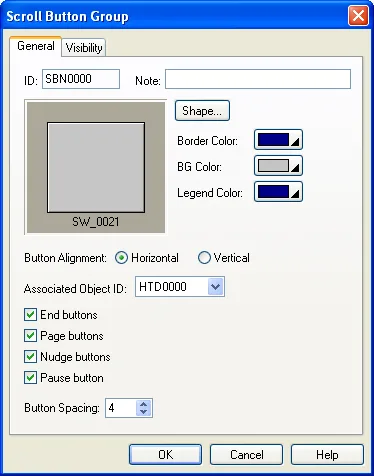
The following table describes each property in the General page.
|
Property |
Description | |
|---|---|---|
| ID | The object’s identifier. It is generated when the object is created. The identifier is unique within the screen where the object is located. The format of the IDs for the scroll button groups is SBNnnnn. | |
| Note | You can type a note for the scroll button group. | |
| Shape settings |
For details about the following properties, see
Section 4.3.4 Setting up the Shape of an Object.
 , Border Color, BG Color. |
|
| Legend Color | The color of the legend for every button of the scroll button group. | |
| Button Alignment | Horizontal | The buttons of the scroll button group are aligned in a row. |
| Vertical | The buttons of the scroll button group are aligned in a column. | |
| Associated Object ID | The ID of the object that the scroll button group will be used to scroll its content. You can select the associated object from this drop-down list which displays the IDs of objects on the same screen that support the scroll operation. | |
| End buttons | Check this item if you want the scroll button group to include the buttons that scroll the content to the start or to the end. | |
| Page buttons | Check this item if you want the scroll button group to include the buttons that scroll the content each time by one page. | |
| Nudge buttons | Check this item if you want the scroll button group to include the buttons that nudge the content. | |
| Pause button | Check this item if you want the scroll button group to include the Pause button. | |
| Button Spacing | The distance in pixels between two adjacent buttons. | |
Need PM Designer itself?
V4 for current PK, PT, ITV and PM panels, V2 for older models. Free, sent by email.
Source.Section 5.10.4 of the PM Designer Software User Manual, Edition 2.0, © Cermate Technologies Inc. (www.cermate.com, service@cermate.com). Reproduced online, with the manual's own figures, by TSL Automation Solutions, authorised Cermate distributor, for users of Cermate HMI panels. PM Designer and PanelMaster are trademarks of Cermate Technologies Inc.
Text and figures are the manufacturer's and may describe features your panel or software version does not have. For a plain-language introduction read the PM Designer guide; for help with a specific panel contact TSL Automation.