
Chapter 12 of 13 · PM Designer guide
PM Designer V4 vs V2: what is new and when to upgrade
PM Designer V4 keeps the workflow, screens, objects and native script of V2 and adds the things a connected machine needs today: an MQTT client with its own macro commands, JSON parsing, an OPC UA client driver, a CANbus driver, time-zone handling, SMS alerts through Cermate's IDCS cloud, file-buffer record macros, 64-bit builds and operating systems for the current PK, PT, ITV and PM panels. V2 (2.1) stays for the earlier panel generations. Here is what changes, what converts, and how to choose.
Applies to PM Designer V2.1 and V4.0Updated 11 Nov 2026Manual reference: V4.0 application notes
What stays the same
The user manual installed with V4.0 is the same file as the one installed with V2.1, byte for byte, which tells you how much carries over: the project structure, General Setup, links and drivers, tags, every screen object, alarms, recipes, data loggers, the macro language, compile, simulate and download. If you know V2 you know V4; the differences below are additions, documented in the Note folder of the V4 installation rather than in the manual.
Panel support: the real reason to pick a version
Each version carries the runtime operating system for the panels it supports, and the files are visible in the installation folder. V4.0 ships os_K2043 to os_K2150 (PK2043 to PK2150), os_2043 to os_2150 (the PT series), os_IT407, os_IT410 and os_IT415 (ITV407 to ITV415) and os_M2102 and os_M2103 (PM series). V2.1 ships the earlier generations: os_1070 to os_1150 (PT1070 to PT1150), os_A43 to os_A100 (PA series), the first os_K43 to os_K100, plus gateway and special models. A panel with no OS file in a version cannot be compiled for in that version, whatever the project looks like. Check the model table on the guide home page, or ask us with the label photo.
Project files and conversion
V4 saves .pm4 projects and compiles to .pl4 runtime files (.pe4 for the Windows HMI runtime); V2 uses .pm2, .pl3 and .pe3. V4 opens a V2 project and converts it on the way in. Our conversion checklist:
- Copy the
.pm2somewhere safe; the conversion is one way. - Open it in V4 and compile before changing anything. Read every warning in the Build List.
- Change the panel model to the V4-supported replacement if the original is a V2-only panel, then walk every screen at the new resolution.
- Re-check each link: driver names and parameters survive, but confirm the Parameter page and any sub-links.
- Test every macro in the off-line simulator, especially string and file commands.
- Download with Runtime Data and System Programs ticked so the panel OS is updated to the V4 generation.
MQTT client
V4 has a built-in MQTT client configured in the MQTT Client dialog (broker, credentials, publish topics by number, subscribe topics) and driven by six macro commands described in the "MQTT Related Macro Commands" note:
| Command | Does |
|---|---|
MqttP | Publish a message; topic and payload are null-terminated Unicode strings. |
MqttP_IS | Publish to a predefined topic number with a Unicode string payload. |
MqttP_IF | Publish to a predefined topic number with a payload built from a text format (a template with embedded variables), the easiest way to send JSON. |
MqttGet | Fetch a received message from a subscribed topic. |
MqttChkTopic | Identify which subscribed topic a message belongs to. |
MqttProcMsg | Parse a message into variables according to a text format. |
A Time Macro that packs a few words into a text format and calls MqttP_IF every 10 seconds is all it takes to put a PK or PT panel on a plant dashboard without a gateway. The runtime also uses MQTT for Cermate's IDCS cloud service.
JSON macros
Two commands parse JSON that arrives by MQTT, file or serial link. GetJsonVal(P2, P3, P4) finds a named value in a JSON string and converts it to a given type (16- and 64-bit integers, floats, strings, bits), returning a completion code (0 to 127 success, 65535 not found). GetJsonObjVal(P2, P3, P4) parses an object or an array of objects against a text format that defines the members and writes them to a block of memory, returning how many objects it parsed. The strings must be Unicode (L"..."), and the text format must list the members in the order they appear in the data.
$U0 = L"{"value_1" : 100, "value_2" : 200}"
$U100 = L"value_2"
$U200 = GetJsonVal($U0, $U100, $U201) (U)   // $U201 = 200, $U200 = 0
OPC UA client
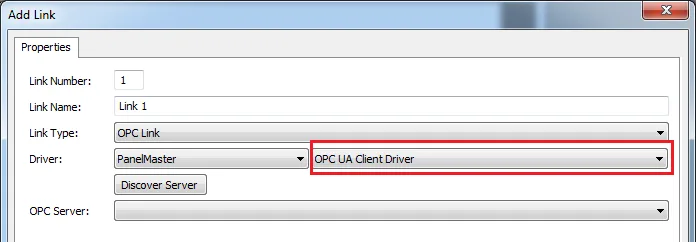
The OPC UA client driver (Section 3.4.12 and the "Using the OPC UA Client Driver" note) is configured as an OPC link: discover servers locally or on a named host, test the connection with optional user name and password, browse the address space and load the nodes you need as tags, including arrays. The .NET OPC UA stack is the only managed code in V4 and runs on the Windows HMI runtime and on panels whose OS supports it. It is the right path when the data source is a modern PLC or SCADA with an OPC UA server and you want tags rather than register maps.
CANbus driver
V4 adds a CAN bus driver built on the Generic Device model: the panel sends and receives raw CAN frames under macro control, so the application designer defines the frame format and the exchange sequence. Cermate's CAN Bus Driver Guide (currently in Chinese only, in the V4 Note folder) documents the macro commands. It suits custom devices and simple CANopen-style exchanges; for a standard CANopen or J1939 master, ask us about a dedicated driver.
Time zone and time conversion
Write a time-zone code to system word $S1039 to change the panel's time zone at runtime (0 is UTC+8, 14 is UTC, 20 is UTC+5, 15 is UTC+1, 5 is UTC-8; the "Setting Time Zone" note lists all 33). Utc2Local(P2, P3, P4) converts a UTC seconds value, as received from a server or GPS, into a local date and time array using the same zone codes plus an adjustment in seconds. SAVE2LB_T stores a logger record with a time stamp you supply instead of the panel clock.
SMS alerts through IDCS
With the panel connected to Cermate's IDCS cloud service and a notification list of up to five registered recipients set up for the device, V4 can send SMS messages in three severity classes (alert, warning, message) either automatically when an alarm occurs or on demand from a macro. Each recipient is subscribed to the classes they should receive. The "Sending Short Messages through IDCS" note describes the setup; the service itself is Cermate's and needs an account.
File buffer records and file copies
Four commands turn a file buffer into a record set: FB_REC reads record n of a buffer into a word array (0 is the oldest), FB_REC_CNT returns the record count, and FB_REC_DATE and FB_REC_TIME return a record's date and time. With LB_2_FB to copy a logger into a buffer, a macro can post-process logged data, compute shift totals or build a report line without a PC. COPY_FILE_NPB copies a file without the progress bar, reporting progress 0 to 10000 in a word so the operator can keep working, and the "Data Structure of Time Range" note documents the 12-word block used to pass a date and time range to query and export operations.
Runtime and platform
V4 includes 64-bit Windows builds of the HMI runtime and simulator alongside the 32-bit ones, a client and server HMI arrangement with recipe synchronisation commands (GET_RCP_BLK, SET_RCP_BLK, see Chapter 8), drivers compiled for the Linux ARM operating systems of current panels, and tag data type import for Allen-Bradley, Beckhoff, CoDeSys, Mitsubishi, Omron EtherNet/IP and Panasonic MEWTOCOL7 controllers.
Which version should you use?
- New project, current panel: V4, always.
- Existing V2 project on a current panel: convert to V4 when you next touch it, following the checklist above; keep the V2 copy.
- Existing V2 project on a V2-only panel: stay on V2 for maintenance, and plan the replacement panel with us so the eventual conversion is a single step.
- Mixed estate: install both; they coexist on one PC (Chapter 1).
Frequently asked questions
Can PM Designer V4 open a V2 project?
Yes. V4 converts a .pm2 project to .pm4 on opening. Keep a backup, compile before editing, check links and macros, and make sure the target panel is one V4 supports.
Does PM Designer V4 support MQTT?
Yes. V4 has a built-in MQTT client and six macro commands (MqttP, MqttP_IS, MqttP_IF, MqttGet, MqttChkTopic, MqttProcMsg) to publish and process messages, plus GetJsonVal and GetJsonObjVal to parse JSON payloads.
Does PM Designer support OPC UA?
V4 includes an OPC UA client driver: configure an OPC link, browse the server and load nodes as tags. It runs on the Windows HMI runtime and on panels whose operating system supports it.
What file extensions do V2 and V4 use?
V2: .pm2 projects, .pl3 compiled runtime, .pe3 for the PC runtime. V4: .pm4, .pl4 and .pe4. Both build .prp runtime packages for field updates.
Is PM Designer V4 64-bit?
The designer is a 32-bit Windows application that runs on 64-bit Windows; V4 ships 64-bit builds of the HMI runtime and simulator alongside the 32-bit ones.
Stuck on a Cermate panel?
TSL Automation has supplied and supported Cermate HMIs since 2015. Send us the model, the PM Designer version and a screenshot of the error.
Written by TSL Automation Solutions from the PM Designer user manual and application notes that ship with the software, and from our own support work. Screenshots are from the manual and remain the property of Cermate Technologies Inc. PM Designer and PanelMaster are trademarks of Cermate Technologies Inc. Check your panel's own manual for model-specific limits.