
Section 13.3.5 · Chapter 13: Data Collection and Historic Displays
Historic Trend Graph - Curve Settings
This section describes how to define the curves of the historic trend graph. The following is an example of the curve page.
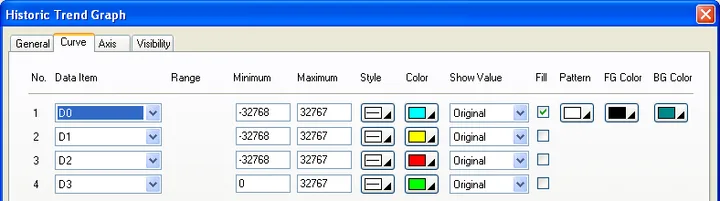
The following table describes each property on the Curve page.
| Property | Description | ||
|---|---|---|---|
| No | The number of the curve. | ||
| Data Item | Select a data item in the associated data logger for the curve. | ||
| Range | Check this option so the minimum and the maximum for the Y values of the associated curve will be specified at runtime. This option is available only when the Dynamic Range option on the General page is checked. | ||
| Minimum | The Y minimum of the data value of the associated curve. This property is available when the Dynamic Range option is not selected. | ||
| Maximum | The Y maximum of the data value of the associated curve. This property is available when the Dynamic Range option is not selected. | ||
| Style | Select a style for the trend curve. | ||
| Color | Select a color for the trend curve. | ||
| Show Value | Select one of the following methods for displaying the selected data point value. | ||
| Show Value | Description | ||
| (None) | Does not display the data point value. | ||
| Original | Displays the data point value without modification. | ||
| Scaled | Displays the corresponding Y axis value of the data point. | ||
| Fill | Check this option if you want the area below the trend curve to be filled. And the area is filled with the specified pattern and colors. | ||
| Pattern | Specifies the fill pattern for the selected curve. | ||
| FG Color | Specifies the color for the selected curve that will be used for painting the black part of the fill pattern. | ||
| BG Color |
|
||
Need PM Designer itself?
V4 for current PK, PT, ITV and PM panels, V2 for older models. Free, sent by email.
Source.Section 13.3.5 of the PM Designer Software User Manual, Edition 2.0, © Cermate Technologies Inc. (www.cermate.com, service@cermate.com). Reproduced online, with the manual's own figures, by TSL Automation Solutions, authorised Cermate distributor, for users of Cermate HMI panels. PM Designer and PanelMaster are trademarks of Cermate Technologies Inc.
Text and figures are the manufacturer's and may describe features your panel or software version does not have. For a plain-language introduction read the PM Designer guide; for help with a specific panel contact TSL Automation.