
Section 13.7.6 · Chapter 13: Data Collection and Historic Displays
Historic Radar Chart - Scale Settings
This section describes how to define the Time Slice and the Value Scale (X axis and Y axis) for the historic radar chart.
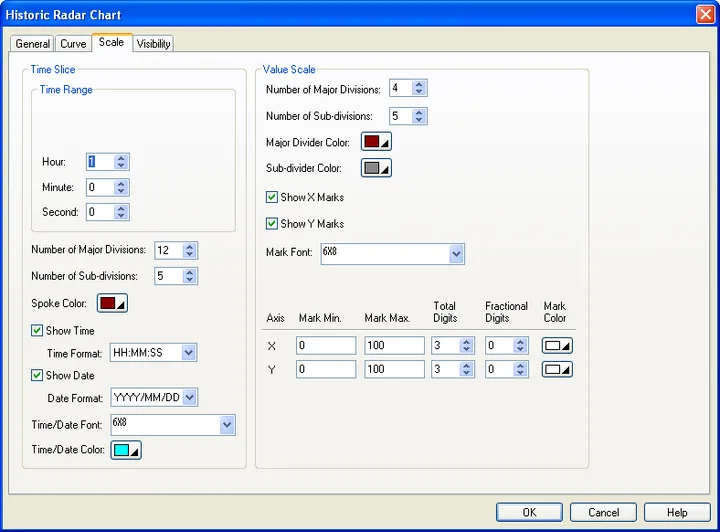
The following table describes each property in the Scale page.
| Property | Description | ||
|---|---|---|---|
| Time Slice – Time Range | |||
| Hour/Minute/Second | Specifies the maximum time duration. | ||
| Time Slice | Number of Major Divisions | The number of major divisions for the X axis. The minimum you can specify is one. | |
| Number of Sub-divisions | The number of divisions between two adjacent major ticks. The minimum you can specify is one. | ||
| Spoke Color | Select a color for the vertical grids. | ||
| Show Time | Check this option if you want to display the time. You need to select a format for displaying the time. | ||
| Time Format | The format of how the time is displayed. There are two formats available. | ||
| Format | Description | ||
| HH:MM | HH: 00-23 (hour); MM: 00-59 (minute) | ||
| HH:MM:SS | HH: 00-23 (hour); MM: 00-59 (minute); SS: 00-59 (second) | ||
| Show Date | Check this option if you want to display the date. You need to select a format for displaying the date. | ||
| Date Format | The format of how the date is displayed. There are 17 formats available. | ||
| Time/Date Font | Font of the time/date. | ||
| Time/Date Color | Select a color for the time/date. | ||
| Value Scale | Number of Major Divisions | The number of major divisions for the value scale. The minimum you can specify is one. | |
| Number of Sub-divisions | The number of divisions between two adjacent major divisions. The minimum you can specify is one. | ||
| Major Divider Color | Select a color for the major divider. | ||
| Sub-Divider Color | Select a color for the sub-divider. | ||
| Show X Marks | Check this option if you want the X Axis to have marks. | ||
| Show Y Marks | Check this option if you want the Y Axis to have marks. | ||
| Mark Font | The font of the marks. | ||
| Value Scale - Axis | Specifies the X/Y axis for the value scale. | ||
| Axis | The name of the axis for the value scale. | ||
| Mark Min. | The minimum of the marks. You can specify a 32-bit signed integer. | ||
| Mark Max. | The maximum of the marks. You can specify a 32-bit signed integer. | ||
| Total Digits | The total digits to be displayed for the marks. | ||
| Fractional Digits | The number of fractional digits for the marks. For example, when the Maximum is 5000, the Total Digits is 4, and the Fractional Digits is 2, the mark for the Maximum will be 50.00. | ||
| Mark Color | Select a color for the mark. | ||
Need PM Designer itself?
V4 for current PK, PT, ITV and PM panels, V2 for older models. Free, sent by email.
Source.Section 13.7.6 of the PM Designer Software User Manual, Edition 2.0, © Cermate Technologies Inc. (www.cermate.com, service@cermate.com). Reproduced online, with the manual's own figures, by TSL Automation Solutions, authorised Cermate distributor, for users of Cermate HMI panels. PM Designer and PanelMaster are trademarks of Cermate Technologies Inc.
Text and figures are the manufacturer's and may describe features your panel or software version does not have. For a plain-language introduction read the PM Designer guide; for help with a specific panel contact TSL Automation.