
Section 20.1.3 · Chapter 20: Setting up Target Panel
ASCII Character Keypad
The target panel displays the ASCII Character keypad to let you enter an ASCII character when you press and release the Character Entry object. The following is an example of the Character Keypad.
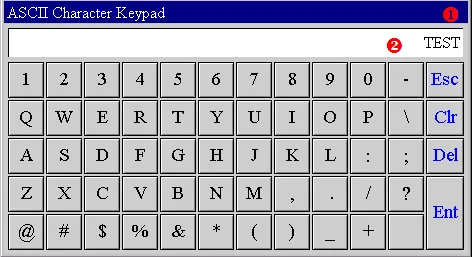
The following table describes each item on the keypad screen.
|
Item |
Description | |
|---|---|---|
 Title Bar |
Press and hold the title bar to move the window screen. |
|
 Keypad Display |
Display the current input string | |
| Buttons | ASCII Characters | Press the button to enter an ASCII character. |
| Esc | Press it to close the screen and discard all changes. | |
| Clr | Press it to clear the input value. | |
| Del | Press it to delete the preceding character. | |
| Ent | Press it to close the screen and accept all changes. | |
Need PM Designer itself?
V4 for current PK, PT, ITV and PM panels, V2 for older models. Free, sent by email.
Source.Section 20.1.3 of the PM Designer Software User Manual, Edition 2.0, © Cermate Technologies Inc. (www.cermate.com, service@cermate.com). Reproduced online, with the manual's own figures, by TSL Automation Solutions, authorised Cermate distributor, for users of Cermate HMI panels. PM Designer and PanelMaster are trademarks of Cermate Technologies Inc.
Text and figures are the manufacturer's and may describe features your panel or software version does not have. For a plain-language introduction read the PM Designer guide; for help with a specific panel contact TSL Automation.