
Section 7.8.2 · Chapter 7: Displaying and Inputting Data
Day-of-week Display - General Settings
This section describes how to define the general settings for a day-of-week display. The following is an example of the General page of the Day-of-week property sheet.
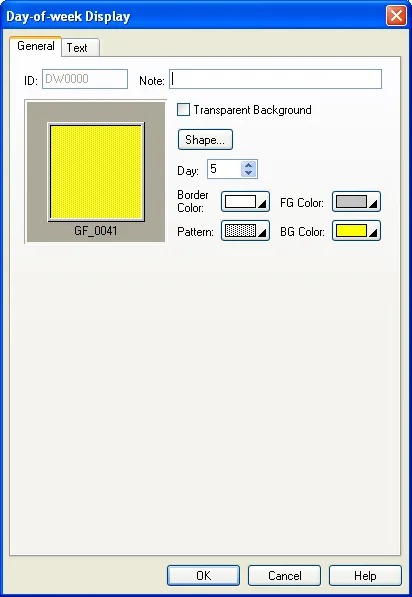
The following table describes each property in the General page of the Day-of-week property sheet.
|
Property |
Description |
|---|---|
| ID | The object’s identifier. It is generated when the object is created. The identifier is unique within the screen where the object is located. The format of the IDs for the day-of-week displays is DWnnnn. |
| Note | You can type a note for the object. |
| Transparent Background | Select this option if you want the object to have a transparent background. |
| Shape settings |
For details about the following properties, see
Section 4.3.4 Setting up the Shape of an Object.
 ,
Border Color, Pattern, FG Color, BG Color |
| Day | Select a day from 0 to 6 so you can view and set the Pattern, FG Color, and BG Color for that day. Day 0 corresponds to Sunday, day 1 corresponds to Monday, and so on. |
Need PM Designer itself?
V4 for current PK, PT, ITV and PM panels, V2 for older models. Free, sent by email.
Source.Section 7.8.2 of the PM Designer Software User Manual, Edition 2.0, © Cermate Technologies Inc. (www.cermate.com, service@cermate.com). Reproduced online, with the manual's own figures, by TSL Automation Solutions, authorised Cermate distributor, for users of Cermate HMI panels. PM Designer and PanelMaster are trademarks of Cermate Technologies Inc.
Text and figures are the manufacturer's and may describe features your panel or software version does not have. For a plain-language introduction read the PM Designer guide; for help with a specific panel contact TSL Automation.