
Section 8.2.2 · Chapter 8: Graphs and Charts
Meter - Operation Options
The following operation options can be added to a meter to make it more informative. You need to select and set these options in the Meter property sheet.
|
Options |
Description |
|---|---|
| Range Display |
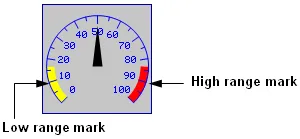 The meter can display the low range mark and the high range mark along its swing path. The limits for range marks can be specified at runtime by the designated variables. Select and set this option in the Range page. |
| Scale |
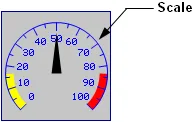 The meter can have a scale. The appearance of meters' scale is improved by the anti-aliasing graphic functions. Select and set this option in the Scale page. |
| Visibility Control | The meter can be shown or hidden either by a specified bit or by the current user level. Select and set this option in the Visibility page. |
Need PM Designer itself?
V4 for current PK, PT, ITV and PM panels, V2 for older models. Free, sent by email.
Source.Section 8.2.2 of the PM Designer Software User Manual, Edition 2.0, © Cermate Technologies Inc. (www.cermate.com, service@cermate.com). Reproduced online, with the manual's own figures, by TSL Automation Solutions, authorised Cermate distributor, for users of Cermate HMI panels. PM Designer and PanelMaster are trademarks of Cermate Technologies Inc.
Text and figures are the manufacturer's and may describe features your panel or software version does not have. For a plain-language introduction read the PM Designer guide; for help with a specific panel contact TSL Automation.