
Section 4.4.1.2 · Chapter 4: Designing Screens
Setting the Custom States of an Object
In the General page of the object’s property dialog box, with the Custom
state type selected, click the
 button to bring up the
Custom State Value dialog box as the example shown below.
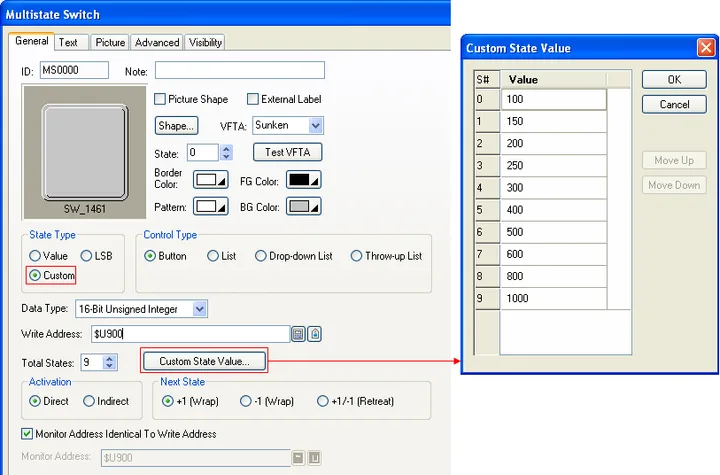
You can assign a positive integer for each state in the dialog box. To edit the value, click the row of that state under the value column.
You can use the Move Up button and the Move Down button to adjust the position of state values. To move up or move down the state values, you need to make a selection first. To select a state, click the header column. To select multiple rows, click the header column and use Ctrl+Click to add a row to the selection.
Need PM Designer itself?
V4 for current PK, PT, ITV and PM panels, V2 for older models. Free, sent by email.
Source.Section 4.4.1.2 of the PM Designer Software User Manual, Edition 2.0, © Cermate Technologies Inc. (www.cermate.com, service@cermate.com). Reproduced online, with the manual's own figures, by TSL Automation Solutions, authorised Cermate distributor, for users of Cermate HMI panels. PM Designer and PanelMaster are trademarks of Cermate Technologies Inc.
Text and figures are the manufacturer's and may describe features your panel or software version does not have. For a plain-language introduction read the PM Designer guide; for help with a specific panel contact TSL Automation.