
Section 4.4.3.2 · Chapter 4: Designing Screens
Address Input Keypad
With the address input keypad, you can enter an address easily. Usually, you
click  to bring up the address input keypad as shown below.
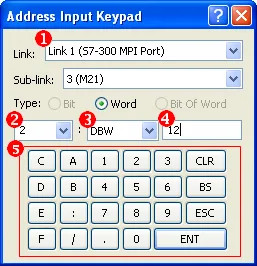
| Item | Property | Description | |
|---|---|---|---|
| 1 | Link | Click the down arrow and select a link from the drop down list. | |
| Sub-Link | Click the down arrow and select a sub-link from the drop down list. Available when the sub-link is used. | ||
| Type | Select the address type. Word for word devices. Bit or Bit of Word for bit devices. | ||
| 2 | PLC Address | Click the down arrow and select a value between 0 and 255 or an indirect address between [$I0] and [$I15] as the PLC Address. If an indirect address is used, the plc address can be dynamically changed. | |
| 3 | Location Type | Click the down arrow and select an item from the drop down list as the location type. | |
| 4 | Address | Specify the address. | |
| 5 | Input keypad | Buttons | Description |
 |
Clears all the texts in the address field. | ||
 |
Deletes all selected texts, if any, or the text character to the left of the cursor in the address field. | ||
 |
Cancels the address input and escapes the dialog. | ||
 |
Checks and enters the address if valid. | ||
| Others | Click to specify the address. Only available when the Address field holds the input focus. | ||
 |
Click the help button to see how to specify word or bit
devices and their addresses for the specified link in
the following pop-up dialog.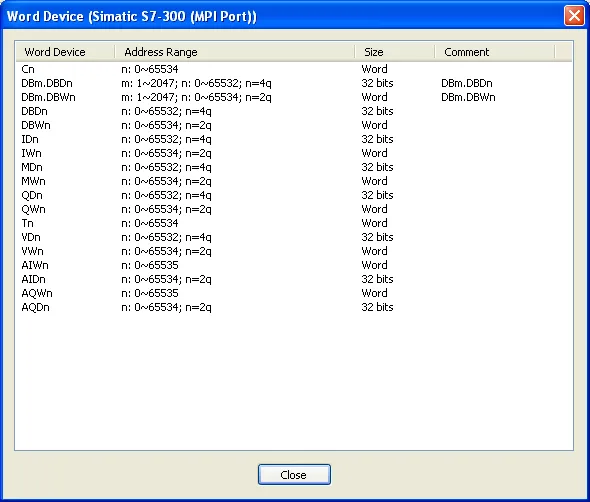 |
||
Need PM Designer itself?
V4 for current PK, PT, ITV and PM panels, V2 for older models. Free, sent by email.
Source.Section 4.4.3.2 of the PM Designer Software User Manual, Edition 2.0, © Cermate Technologies Inc. (www.cermate.com, service@cermate.com). Reproduced online, with the manual's own figures, by TSL Automation Solutions, authorised Cermate distributor, for users of Cermate HMI panels. PM Designer and PanelMaster are trademarks of Cermate Technologies Inc.
Text and figures are the manufacturer's and may describe features your panel or software version does not have. For a plain-language introduction read the PM Designer guide; for help with a specific panel contact TSL Automation.