
Section 3.4.11 · Chapter 3: Creating Panel Applications
Accessing Siemens PLC through Ethernet
This section describes how to configure HMI units and Siemens PLC program so the HMI unit and Siemens PLC can communicate through Ethernet.
■ Creating a new link
To communicate with Siemens PLC, you need to create the following
communication link for the HMI unit.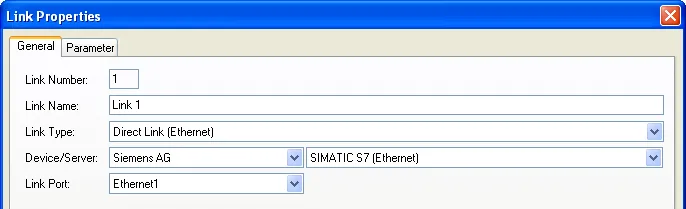
The driver of SIMATIC S7 (Ethernet) allows index addressing for data blocks. For examples, the addresses shown below are valid now.
DB[$I3].DBW100
DB[$I5+2].DBD[$I10+16]
DB[$I0+2].DBX[$I1].5
Note: The support of data block indexing can be provided for any PLC driver upon request.
■ Setting the link properties
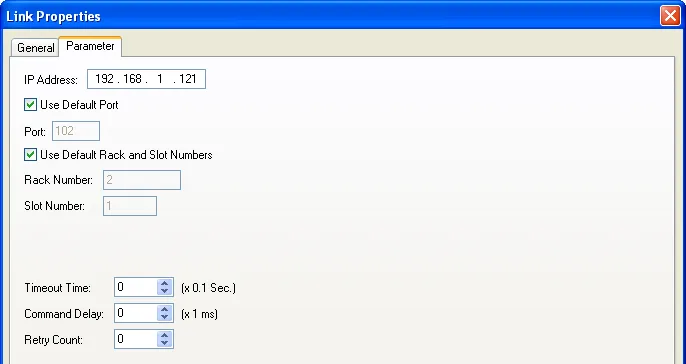
To enable the communication, you need to set the Rack number and Slot number
upon the Siemens PLC configuration. The following is an example which uses the
default rack and slot number.
■ Making data blocks in the Siemens PLC accessible
To make the data blocks in the Siemens PLC
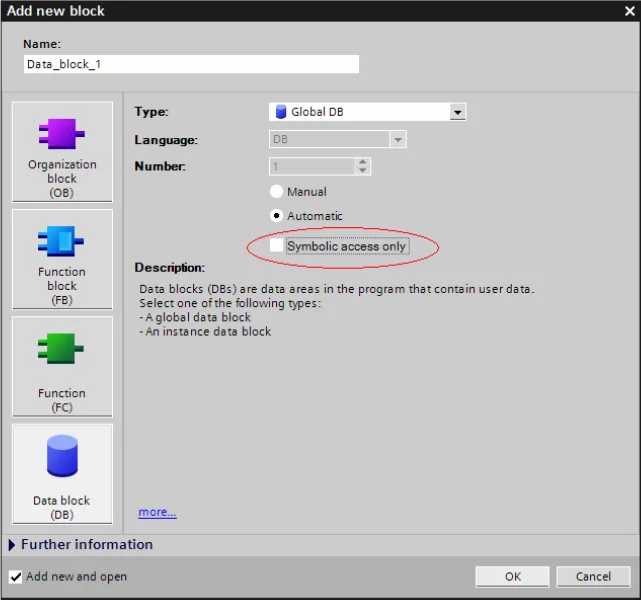
accessible, all the data blocks in the program must have the "Symbolic access
only" option unchecked. If the data block is symbolic access only,
the HMI units will not be allowed to access the data blocks and the
communication error will be shown up. The following is an example of a data
block with "Symbolic access only" option unchecked.
Need PM Designer itself?
V4 for current PK, PT, ITV and PM panels, V2 for older models. Free, sent by email.
Source.Section 3.4.11 of the PM Designer Software User Manual, Edition 2.0, © Cermate Technologies Inc. (www.cermate.com, service@cermate.com). Reproduced online, with the manual's own figures, by TSL Automation Solutions, authorised Cermate distributor, for users of Cermate HMI panels. PM Designer and PanelMaster are trademarks of Cermate Technologies Inc.
Text and figures are the manufacturer's and may describe features your panel or software version does not have. For a plain-language introduction read the PM Designer guide; for help with a specific panel contact TSL Automation.