
Section 3.4.4 · Chapter 3: Creating Panel Applications
Communication Parameter Settings (Ethernet Port)
This section describes how to set up the communication parameters for Ethernet links using the Parameter page of the Link Properties dialog box. The following is an example of the Parameter page for an Ethernet direct link.
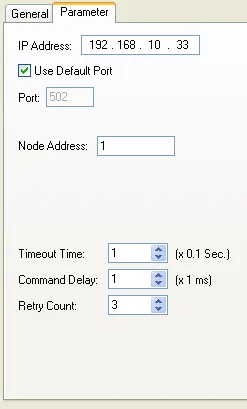
The following table describes each property in the Parameter page of the Link Properties dialog box for an Ethernet link.
|
Property |
Description |
|---|---|
| IP Address | The IP address of the connected device. |
| Use Default Port | Check this option if the default IP port is used. |
| Port | Specifies the IP port used |
| Node Address | Specifies the node address of the connected device. |
| Timeout Time | The maximum time allowed for the communication driver to wait for a reply from the connected device. When the elapsed time exceeds the Timeout Time, the communication driver assumes the communication failed. |
| Command Delay | If the Command Delay is 0, the communication driver immediately sends the next request to the connected device when it receives a reply from the last request. If the Command Delay is nonzero, the communication driver delays for the specified amount of time before sending the next request to the connected device. |
| Retry Count | The number of times the communication driver will retry for each request to get a successful reply from the connected device. If the number is zero, the communication driver will use the default retry count. |
Need PM Designer itself?
V4 for current PK, PT, ITV and PM panels, V2 for older models. Free, sent by email.
Source.Section 3.4.4 of the PM Designer Software User Manual, Edition 2.0, © Cermate Technologies Inc. (www.cermate.com, service@cermate.com). Reproduced online, with the manual's own figures, by TSL Automation Solutions, authorised Cermate distributor, for users of Cermate HMI panels. PM Designer and PanelMaster are trademarks of Cermate Technologies Inc.
Text and figures are the manufacturer's and may describe features your panel or software version does not have. For a plain-language introduction read the PM Designer guide; for help with a specific panel contact TSL Automation.