
Section 3.7 · Chapter 3: Creating Panel Applications
Setting up Clock Operations
This section describes how to define Clock Operations for the panel application using the Clock dialog box. The following is an example of the Clock dialog box.
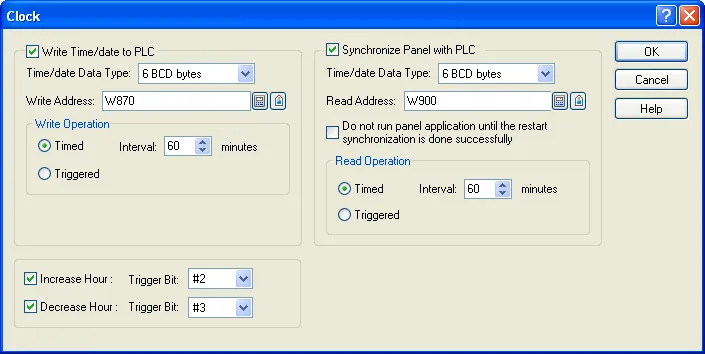
The following table describes each property in the Clock dialog box.
| Description | Description | ||||
|---|---|---|---|---|---|
| Write | Write Time/date to PLC | Select this option so the panel will write time and date information to the specified variable. | |||
| Time/date Data Type | Select one of the following data types for the output time and data information. | ||||
| Data Type | Description | ||||
| 6 BCD bytes | The following shows the data structure. | ||||
| Byte No. | Content | ||||
| 0 | Minute; 0-59 | ||||
| 1 | Hour; 0-23 | ||||
| 2 | Day; 1-31 | ||||
| 3 | Month; 1-12 | ||||
| 4 | Year; 00-99 | ||||
| 5 | Day-of-week; 0(Sunday)-6(Saturday) | ||||
| 6 | Second; 0-59 | ||||
| 7 | 0 | ||||
| Note: All the values are in BCD format. | |||||
| 8 BCD bytes | The following shows the data structure. | ||||
| Byte No. | Content | ||||
| 0 | Minute; 0-59 | ||||
| 1 | Hour; 0-23 | ||||
| 2 | Day; 1-31 | ||||
| 3 | Month; 1-12 | ||||
| 4 | Year; 00-99 | ||||
| 5 | Day-of-week; 0(Sunday)-6(Saturday) | ||||
| 6 | Second; 0-59 | ||||
| 7 | 0 | ||||
| Note: All the values are in BCD format. | |||||
| 7 BCD words | The following shows the data structure. | ||||
| Word No. | Content | ||||
| 0 | Second; 0-59 | ||||
| 1 | Minute; 0-59 | ||||
| 2 | Hour; 0-23 | ||||
| 3 | Day; 1-31 | ||||
| 4 | Month; 1-12 | ||||
| 5 | Year; 00-99 | ||||
| 6 | Day-of-week; 0(Sunday)-6(Saturday) | ||||
| 7 binary words | The following shows the data structure. | ||||
| Word No. | Content | ||||
| 0 | Second; 0-59 | ||||
| 1 | Minute; 0-59 | ||||
| 2 | Hour; 0-23 | ||||
| 3 | Day; 1-31 | ||||
| 4 | Month; 1-12 | ||||
| 5 | Year; 00-99 | ||||
| 6 | Day-of-week; 0(Sunday)-6(Saturday) | ||||
| 7 BCD bytes (8 bytes I/O) | The data type was originally requested for synchronizing the HMI unit with an Omron CJ2M PLC. The data has seven bytes totally as shown in the following but the I/O operation actually takes 8 bytes. | ||||
| Byte No. | Content | ||||
| 0 | Second; 0-59 | ||||
| 1 | Minute; 0-59 | ||||
| 2 | Hour; 0-23 | ||||
| 3 | Day; 1-31 | ||||
| 4 | Month; 1-12 | ||||
| 5 | Year; 00-99 | ||||
| 6 | Day-of-week; 0(Sunday)-6(Saturday) | ||||
| 7 | 0 | ||||
| Note: All the values are in BCD format. | |||||
| Write Address | Specifies the variable that will receive the output time and date information. | ||||
| Write Operation | Timed | When this item is selected, the panel writes time and date information to the specified variable periodically at a rate specified in the Interval field. Specify an interval between 1 and 255 minutes. | |||
| Triggered | When this item is selected, the panel writes time and date information to the specified variable whenever the specified trigger bit changes from Off to On. | ||||
| Read | Synchronize Panel with PLC | Select this option so the panel will read time and date information from the specified variable and adjust its clock accordingly. | |||
| Time/date Data Type | Specifies the data type for the input time and data information. For details, see the description of the Time/date Data Type field of the Write group. | ||||
| Read Address | Specifies the variable that the panel will read the time and date information. | ||||
| Do not run panel application until the restart synchronization is done successfully | Select this option so the panel application does not run until the restart synchronization is done successfully. | ||||
| Read Operation | Timed | When this item is selected, the panel reads time and date information from the specified variable periodically at a rate specified in the Interval field. Specify an interval between 1 and 255 minutes. | |||
| Triggered | When this item is selected, the panel reads time and date information from the specified variable whenever the specified trigger bit changes from Off to On. | ||||
| Increase Hour | Select this option to increase the panel's clock by one, by changing the specified trigger bit from Off to On. | ||||
| Decrease Hour | Select this option to decrease the panel's clock by one, by changing the specified trigger bit from Off to On. | ||||
Need PM Designer itself?
V4 for current PK, PT, ITV and PM panels, V2 for older models. Free, sent by email.
Source.Section 3.7 of the PM Designer Software User Manual, Edition 2.0, © Cermate Technologies Inc. (www.cermate.com, service@cermate.com). Reproduced online, with the manual's own figures, by TSL Automation Solutions, authorised Cermate distributor, for users of Cermate HMI panels. PM Designer and PanelMaster are trademarks of Cermate Technologies Inc.
Text and figures are the manufacturer's and may describe features your panel or software version does not have. For a plain-language introduction read the PM Designer guide; for help with a specific panel contact TSL Automation.